
You've got data everywhere. Stripe events in one tab, a half-configured Mixpanel dashboard in another, and a spreadsheet someone built six months ago that nobody trusts anymore. Your team's making product decisions based on gut feel because pulling actual numbers takes three hours and a SQL query you have to rewrite every time. This is the state of analytics at most SaaS companies under 50 people. Not because they don't care — because nobody sat down and built the thing properly from the start. A customer analytics platform isn't a tool you buy and plug in. It's a system you design. And the teams that design it well ship features faster, churn less, and stop arguing about whether a metric is right. Here's exactly how to build one.
💡 TL;DR
A customer analytics platform for SaaS is a three-layer system: event tracking, a centralised data store, and dashboards your team actually uses. Most companies get the third layer right and skip the first two — which is why their dashboards lie. Start with a clean event schema, route data through a single pipeline (Segment or direct SDK), and build dashboards only after the data is trustworthy. Skip this order and you'll rebuild everything in 12 months.
What a Customer Analytics Platform Actually Is (And Isn't)
Most teams confuse a customer analytics platform with a dashboard tool. That's the wrong mental model. Dashboards are the output. The platform is the system that feeds them — and if that system is broken, the dashboards are just expensive noise.
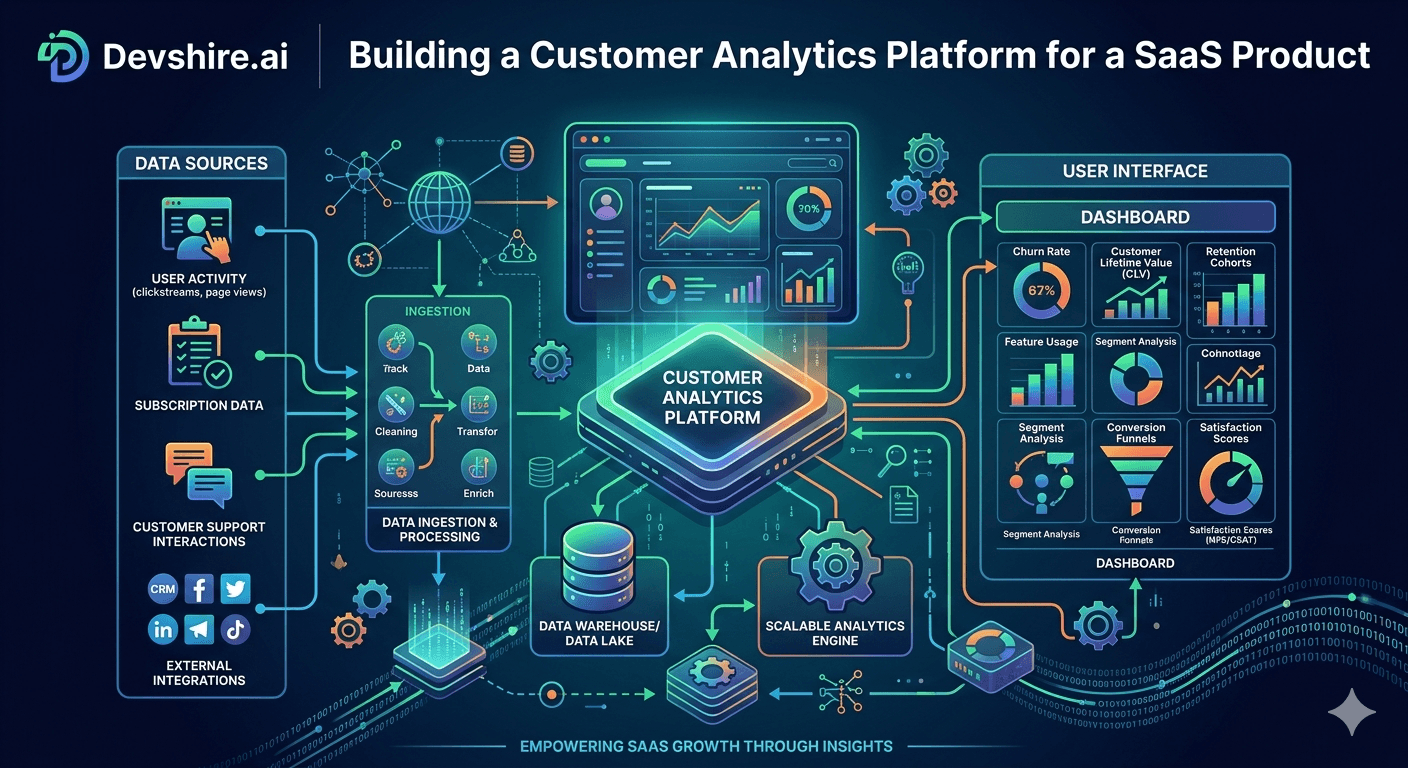
A proper customer analytics platform has three layers working together. First: event collection, which captures what users actually do inside your product. Second: a data store that centralises those events alongside billing data, CRM data, and support tickets. Third: the analytics and visualisation layer where your team asks questions and gets trustworthy answers.
Most SaaS teams have layer three. Almost nobody has layers one and two properly set up. That's why metrics fight between departments — sales says MRR is $180k, finance says $172k, and both are pulling from different places.
⚠️ Common advice that's wrong
A lot of guides tell you to "just install Mixpanel and start tracking." That works fine for a prototype. But if you install any analytics tool before you've defined your event schema, you'll spend 80% of your time cleaning up garbage data instead of analysing it. Design first. Instrument second.
Here's the thing — the companies with the best analytics aren't running the most expensive tools. They're running clean data pipelines into simple dashboards. The tool matters less than the structure underneath it.
Design Your Event Schema Before You Write a Single Line of Tracking Code
This is the step everyone skips. And it's the one that causes the most pain six months later. Your event schema is the naming convention and data structure for everything your users do — and if it's inconsistent, every dashboard built on top of it is wrong.
The schema decisions you make in week one will follow you for years. So spend the time.
📐 Use a consistent naming convention
The standard that works at scale is Object-Action format: project_created, invoice_paid, feature_enabled. Never mix naming styles — userSignedUp and user_signed_up in the same schema will break queries. Pick one format on day one and enforce it.
🏷️ Define your standard properties
Every event should carry the same core properties: user_id, account_id, plan_type, timestamp. These are your join keys. Without them, you can't segment by plan, you can't do account-level analysis, and you can't connect product behaviour to revenue.
🗂️ Track 15–20 core events, not 200
The instinct is to track everything. Don't. Start with the events that map to your key user journey: signed up, activated a feature, invited a teammate, upgraded plan, churned. Get those right before you add anything else. Teams that track 200 events from day one end up trusting none of them.
[INTERNAL LINK: event tracking setup guide → devshire.ai/blog/add-mixpanel-amplitude-app-developer-guide]
Picking Your Stack: What Actually Works at Each Stage
There's no universal right answer here — but there are definitely wrong answers for your current stage. Here's how to think about it.
Stage | Recommended Stack | Monthly Cost (approx) | When to Move On |
|---|---|---|---|
0–100 customers | Mixpanel or Amplitude free tier + Stripe Dashboard | $0–$50 | When you need cross-source queries |
100–1,000 customers | Segment + Mixpanel/Amplitude paid + basic Metabase | $200–$600 | When SQL queries become a daily need |
1,000–10,000 customers | Segment + BigQuery or Redshift + Metabase or Looker Studio | $800–$2,500 | When data team forms |
10,000+ customers | Full data warehouse + dbt + Looker or Tableau | $3,000+ | Hire a data engineer at this stage |
Most early-stage SaaS teams jump straight to a data warehouse before they need one. That's expensive and slow. If you have fewer than 500 customers, Mixpanel's free tier plus Stripe's built-in reporting covers 90% of what you actually need to know.
[INTERNAL LINK: data warehouse comparison → devshire.ai/blog/data-warehouse-startups-snowflake-bigquery-redshift]
Building the Data Pipeline: Route Everything Through One Place
Here's where most DIY analytics systems fall apart. Data flows from five different places — your app, Stripe, your CRM, your support tool, your email platform — and nobody centralized it. So when someone asks "what's the average time to upgrade for users who contacted support in their first 30 days," the answer is "we can't actually pull that."
You need a single routing layer. Segment is the most common choice, and for good reason — it lets you send events from your app once and route them to Mixpanel, your data warehouse, and your CRM simultaneously. But Segment costs money. If you're early stage, a simpler option is a custom event endpoint that writes to Postgres and feeds your dashboarding tool directly.
1️⃣ Step 1 — Instrument your app with server-side events
Client-side tracking (browser JavaScript) gets blocked by ad blockers at a rate of 15–30% depending on your audience. Server-side tracking is more reliable. Fire events from your backend on key user actions — signup, feature use, upgrade — and you'll have cleaner data immediately.
2️⃣ Step 2 — Pull in your billing data
Product analytics without revenue data is half the picture. Connect your Stripe account to your data store. At minimum, sync subscription events: customer.subscription.created, customer.subscription.updated, customer.subscription.deleted. Now you can answer "which features correlate with upgrade."
3️⃣ Step 3 — Add identity resolution
When a user signs up, associate their anonymous session ID with their user ID. This is called an identify call, and it's what lets you see a user's full journey from first page view to paying customer. Without it, your funnel data has a giant hole where pre-signup behaviour should be.
[EXTERNAL LINK: Segment documentation → segment.com/docs/connections/spec/identify/]
Trusted by 500+ startups & agencies
"Hired in 2 hours. First sprint done in 3 days."
Michael L. · Marketing Director
"Way faster than any agency we've used."
Sophia M. · Content Strategist
"1 AI dev replaced our 3-person team cost."
Chris M. · Digital Marketing
Join 500+ teams building 3× faster with Devshire
1 AI-powered senior developer delivers the output of 3 traditional engineers — at 40% of the cost. Hire in under 24 hours.
The 8 Metrics Your Customer Analytics Platform Actually Needs to Answer
You can track hundreds of metrics. But in practice, product teams at SaaS companies make 90% of their decisions based on about eight numbers. Build your platform to answer these — and answer them fast.
📊 Activation rate
The percentage of new signups who reach your "aha moment" within 7 days. You need to define what activation means for your product — it's not the same for every SaaS. If you haven't defined it, that's your first task. [INTERNAL LINK: SaaS activation benchmarks → devshire.ai/blog/build-saas-mvp-fast]
🔄 Feature adoption by cohort
Which features are users who stay 90 days using that churned users didn't? This is your retention driver analysis — and it's impossible to run without a proper customer analytics platform.
💸 MRR by acquisition source
Not just where signups come from — where revenue comes from. Organic might drive 60% of signups but only 30% of MRR if paid drives higher-ACV customers. You can't see this without connecting marketing attribution to billing data.
📉 Churn leading indicators
Accounts that churn usually show signals 2–4 weeks before they cancel: login frequency drops, feature usage narrows, support tickets spike. Build a dashboard that surfaces these before the churn happens, not after.
Dashboard Setup: Build for the Decision, Not the Data
Most analytics dashboards are built backwards. Someone exports everything they can measure and arranges it on a page. Nobody uses it after week two because it doesn't answer specific questions — it just displays numbers.
Build every dashboard around a decision your team makes regularly. "Should we invest more in the onboarding flow?" That's a decision. Build a dashboard for it. "What happened last month?" That's not a decision — that's a report. Those are different things.
🎯 The product team dashboard
Activation rate, 7-day retention, feature adoption by plan, and top drop-off points in the onboarding flow. Refreshes daily. That's it. If you need more than five charts to understand product health, your dashboard has too many charts.
💰 The revenue dashboard
MRR, new MRR, expansion MRR, churned MRR, net revenue retention. These five numbers tell the complete story of whether your SaaS is healthy. Anything else is context — not the headline.
🚨 The churn risk dashboard
Accounts with no login in 14 days, accounts with declining usage week-over-week, accounts whose usage dropped more than 40% from their peak. Surface these weekly to your CS team. Most churn is preventable if you catch it early enough.
[INTERNAL LINK: growth dashboard setup → devshire.ai/blog/build-growth-dashboard-whole-team]
Three Things That Break Customer Analytics Platforms — and How to Fix Them
We've seen teams rebuild their analytics stack from scratch twice in three years. Usually because of one of these three problems. Catch them early and you won't have to.
⚡ Problem 1: No event versioning
You rename a property from user_type to account_type and six months of historical data breaks. Fix: treat your event schema like an API. Version it. Document changes. Never rename properties — deprecate old ones and introduce new ones in parallel.
🐛 Problem 2: No data validation
Events fire with null user IDs, wrong plan types, or missing timestamps. Your dashboards look fine but the numbers are silently wrong. Fix: add a validation layer that rejects malformed events before they hit your data store. Catch it at ingestion, not three months later.
🔧 Problem 3: Analytics owned by no one
When analytics is "everyone's job," events get added ad hoc, naming conventions drift, and nobody audits what's actually firing. Fix: assign one person as the analytics owner — doesn't need to be a data engineer, just someone who cares. They review every new event before it ships.
Honestly, problem three is the most common. Technical debt in analytics is invisible until it blows up. Keep someone accountable for the schema and it stays clean.
Why the Right Developer Makes or Breaks This Build
A customer analytics platform sounds like infrastructure — so teams often hand it to whoever has spare cycles. That's a mistake. This build touches your app's core event system, your billing pipeline, your data warehouse, and your dashboarding layer simultaneously. It needs someone who's done it before.
At devshire.ai, we've matched SaaS teams with developers who specialise in exactly this kind of data infrastructure work — full-stack engineers who understand event schemas, pipeline architecture, and the product analytics tools your team will actually use day-to-day. The teams that invest in the right developer for this build don't rebuild it a year later.
✅ What to look for in a developer for this build
Experience with Segment or a custom event pipeline · Familiarity with BigQuery, Redshift, or Postgres at scale · Has worked with Mixpanel, Amplitude, or Metabase in a production SaaS environment · Understands the difference between product analytics and business intelligence — and when to use each
The Bottom Line
A customer analytics platform is three layers: event collection, a centralised data store, and dashboards. Most teams only build the third layer — which is why their numbers can't be trusted.
Design your event schema before you write any tracking code. Use Object-Action naming (e.g.
project_created) and enforce it from day one.Server-side tracking is more reliable than client-side — ad blockers kill 15–30% of browser-side events depending on your audience.
At under 500 customers, Mixpanel's free tier plus Stripe's dashboard covers 90% of what you need. Don't build a data warehouse you're not ready for.
Build dashboards around decisions, not around data. If a dashboard doesn't answer a specific question your team asks weekly, it won't get used.
Assign one analytics owner. When nobody owns the schema, it drifts — and six months of data becomes untrustworthy.
Churn leading indicators appear 2–4 weeks before cancellation. Build a dashboard that surfaces them early — most churn is preventable if you're watching the right signals.
Frequently Asked Questions
What is a customer analytics platform for SaaS?
A customer analytics platform is the full system that captures what users do in your product, stores that data centrally alongside billing and CRM data, and makes it queryable through dashboards. It's not just a dashboard tool — it's the pipeline and schema underneath the dashboards. Most SaaS teams have the dashboarding layer but skip the data infrastructure, which is why their metrics are unreliable.
Should I use Mixpanel or Amplitude for SaaS product analytics?
Both are strong tools — the choice depends on your team's workflow. Mixpanel is generally easier to set up and better for funnel analysis. Amplitude has stronger cohort and retention reporting. If you're under 1,000 customers, either will work well. The more important decision is your event schema — a bad schema breaks both tools equally. [INTERNAL LINK: Mixpanel vs Amplitude setup → devshire.ai/blog/add-mixpanel-amplitude-app-developer-guide]
Do I need a data warehouse for SaaS analytics?
Not until you need cross-source queries that a product analytics tool can't handle. For most teams, that threshold hits somewhere between 500 and 2,000 customers when you start needing to join product events with billing data, support data, and marketing attribution in a single query. Before that point, a well-configured Mixpanel or Amplitude instance is faster and cheaper.
What events should I track first in a SaaS product?
Start with the 15–20 events that map to your core user journey: signed up, completed onboarding step, activated core feature, invited teammate, upgraded plan, cancelled subscription. These are your funnel events. Get them instrumented cleanly before tracking anything else. The instinct to track everything upfront leads to noisy, untrustworthy data.
How long does it take to build a customer analytics platform?
A basic version — event schema, server-side tracking, Segment integration, and a Metabase dashboard — takes an experienced developer 2–3 weeks to build properly. A more complete setup with a data warehouse, billing integration, and multiple team dashboards is a 6–8 week project. The design phase (event schema, metric definitions) should take at least 3–5 days before any code is written.
What's the difference between product analytics and business intelligence for SaaS?
Product analytics (Mixpanel, Amplitude) answers behavioural questions about what users do inside your product — funnel drop-off, feature adoption, retention curves. Business intelligence (Metabase, Looker, Tableau) answers business questions by joining multiple data sources — revenue by acquisition channel, LTV by plan type, support costs by customer segment. Both matter. They're different tools solving different questions, and most SaaS teams eventually need both.
How do I connect Stripe data to my product analytics?
The cleanest way is to use Stripe webhooks to write subscription events into your data store whenever a billing event fires — subscription created, upgraded, downgraded, cancelled. Sync these events with the same account_id you use in your product event schema. Once they share an identifier, you can join product behaviour to revenue data in any SQL-compatible analytics tool.
Find a Developer Who's Built This Before — in 48 Hours
devshire.ai matches SaaS teams with developers who specialise in data infrastructure, event tracking, and analytics pipelines. Every developer in the network has been screened for real-world tool proficiency — not just keyword matching. Get a shortlist in 48–72 hours. Freelance and full-time options available.
Start Your Search at devshire.ai →
No upfront cost · Shortlist in 48–72 hrs · Freelance & full-time · Stack-matched candidates
About devshire.ai — devshire.ai matches AI-powered engineering talent with product teams building real SaaS infrastructure. Every developer has passed a live proficiency screen. Typical time-to-hire: 8–12 days. Start hiring →
Related reading: How to Add Mixpanel or Amplitude to Your App · Data Warehouse for Startups: Snowflake vs BigQuery vs Redshift · How to Build a Growth Dashboard Your Whole Team Can Use · How to Build a SaaS MVP Fast · SaaS Product Roadmap Planning · How to Add AI Features to Your SaaS







Devshire Team
San Francisco · Responds in <2 hours
Hire your first AI developer — this week
Book a free 30-minute call. We'll match you with the right developer for your project and get you started within 24 hours.
<24h
Time to hire
3×
Faster builds
40%
Cost saved