
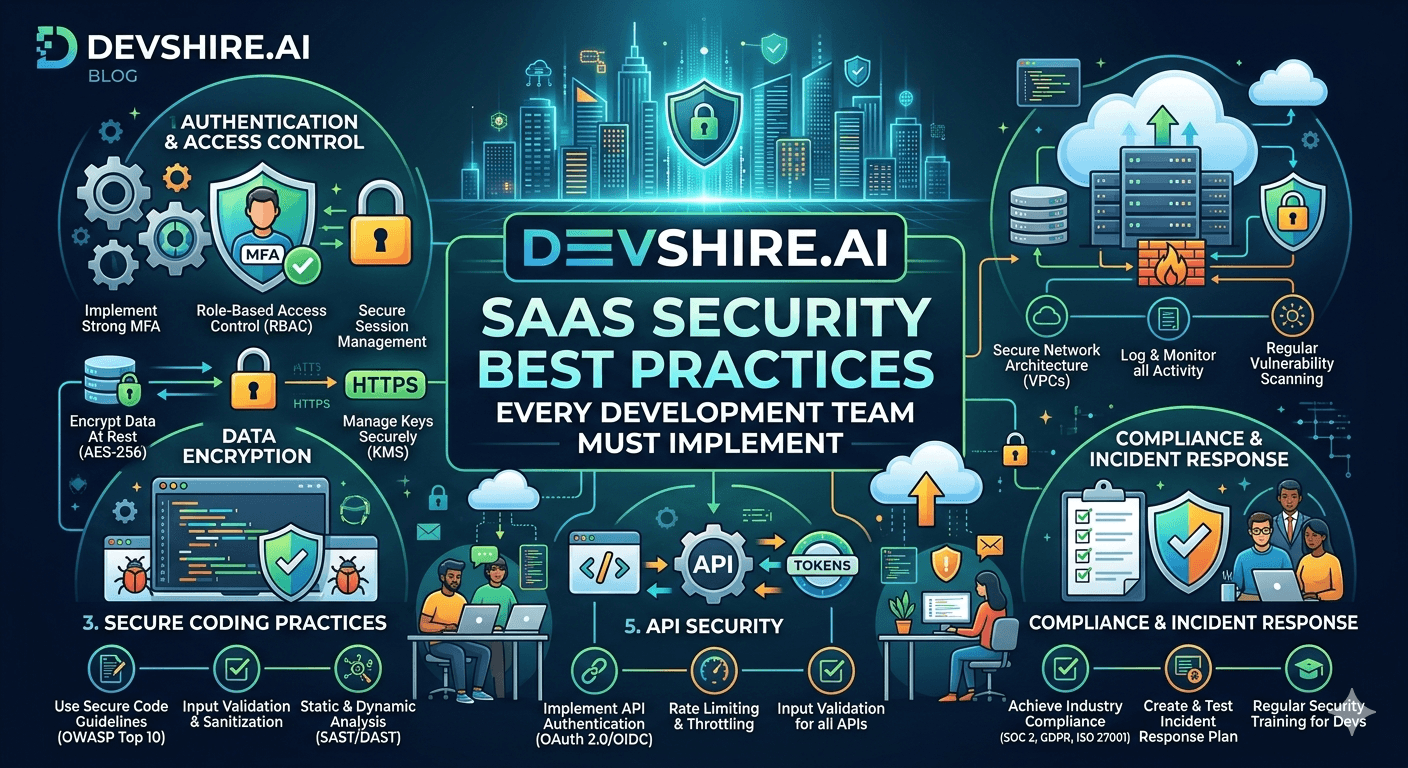
In 2023, a SaaS startup serving 400 SMB customers had their entire user database exfiltrated. The cause was not a sophisticated attack. An API endpoint that returned user records did not check whether the authenticated user had the right to access those specific records — only that they were logged in. Any authenticated user could fetch any other customer's data by guessing sequential IDs. The security gap took 15 minutes to exploit and two months to recover from — customer notifications, legal review, churn, and the reputational cost that followed.
💡 TL;DR
The most dangerous SaaS security gaps are not in your encryption or your firewall. They're in authorisation logic — specifically, missing object-level access checks on API endpoints. OWASP's 2023 API Security Top 10 lists Broken Object Level Authorisation as the number one API vulnerability, and it remains the most exploited in practice. Fix your object-level auth before you buy a security tool. Then: enforce MFA for admin accounts, rotate secrets automatically, and log everything that touches user data. These four things stop 80% of real SaaS breaches.
The Authorisation Gaps That Actually Get SaaS Products Breached
Authentication tells you who someone is. Authorisation tells you what they're allowed to do. Most SaaS security incidents happen in the authorisation layer — not because the attacker bypassed login, but because the system let them do things they shouldn't be able to do once logged in.
Vulnerability | What It Looks Like | Fix |
|---|---|---|
Broken Object Level Authorisation (BOLA) | GET /api/invoices/1247 returns data for any user who can guess the ID | Always verify resource ownership: WHERE id = ? AND user_id = auth.userId |
Missing function-level access control | Admin endpoints return data without checking the user's role | Middleware that checks role before any admin route handler runs |
JWT secret in version control | Anyone with repo access can forge any user's token | Secrets in environment variables, rotated every 90 days |
IDOR via enumerable IDs | Sequential integer IDs make it trivial to scrape all records | Use UUIDs or ULIDs for all user-facing resource IDs |
Over-permissive API scopes | Third-party integrations get full access when they only need read | Scope API keys to minimum required permissions at generation time |
The fix for BOLA is a one-line SQL change. Add AND organisation_id = ? to every query that touches user data, where the organisation ID comes from the authenticated session — not from the request parameters. This single change closes the most common class of SaaS data breach.
Secrets Management — What Goes Wrong and How to Fix It
The GitHub secret scanner blocked 12.8 million secrets from being exposed in public repositories in 2023. Those are the ones it caught. The ones it didn't catch — in private repos, in deployed environment files, in Slack messages — don't have a public count. But the breach pattern is the same: a developer commits a secret to version control, an attacker finds it, and access is compromised.
Here's what a secure secrets workflow looks like for a SaaS development team in 2026:
🔐 Never commit secrets to version control
Use .env files locally and environment variable injection in production. Add .env to .gitignore on day one. Use a pre-commit hook (git-secrets or detect-secrets) that blocks commits containing patterns matching API keys, tokens, or passwords.
🔐 Use a secrets manager for production
AWS Secrets Manager, HashiCorp Vault, or Doppler. Secrets are fetched at runtime, not baked into the deployment. Rotation is automated. Access is logged. If a secret is compromised, you rotate it in one place and every service picks up the new value without a redeployment.
🔐 Rotate secrets on a schedule
Database passwords: every 90 days. API keys for third-party services: every 180 days or immediately on team member departure. JWT signing secrets: every 90 days with a short transition window. Secrets that never rotate are a breach waiting for its trigger.
🔐 Audit third-party service access quarterly
List every external service with API access to your systems. Remove any that aren't actively used. Scope the remaining ones to minimum permissions. Do this quarterly. Most teams discover 3–5 integrations with more access than they need on their first audit.
[EXTERNAL LINK: OWASP API Security Top 10 → owasp.org/API-Security]
Securing the Data Layer — Encryption, Isolation, and Backups
Most SaaS teams handle transport encryption correctly — HTTPS everywhere, TLS 1.2 or 1.3. Where things go wrong is encryption at rest and tenant data isolation. These are the two gaps that turn a database compromise into a full data breach.
Encryption at Rest — What You Actually Need
Database-level encryption (which your managed DB provider — RDS, Supabase, Neon — handles by default on most plans) protects against physical media theft. It does not protect against a compromised application layer. For sensitive fields — payment details, personal health information, PII — add application-level encryption on the specific columns.
Tenant Data Isolation — The Architecture That Prevents Cross-Tenant Leakage
For multi-tenant SaaS, every database query that touches tenant data must include a tenant ID filter derived from the authenticated session — never from the request body. The cleanest implementation is a database-level row security policy (Postgres RLS) that enforces this at the query layer rather than relying on application code to always get it right.
With RLS enabled, a query that forgets the WHERE clause still only returns data for the current tenant. The database enforces what your application code should also enforce — two layers of protection.
API Security — The Checklist That Stops the Attacks That Actually Happen
This is not a comprehensive API security guide. It's the specific controls that stop the attacks that actually show up in SaaS security incidents, based on what OWASP's research and real post-mortems show.
🛡️ Rate limiting on all endpoints — not just auth
Most teams rate-limit their login endpoint. Fewer rate-limit data export endpoints, search endpoints, and bulk operations. Keep rate limits under 100 requests per minute per user for standard endpoints. Data export endpoints should be under 10 per hour. Without this, a compromised account can exfiltrate your entire database overnight through normal API calls.
🛡️ Input validation with schema enforcement
Use Zod (TypeScript) or Joi (JavaScript) to define and enforce the exact shape of every API request. Reject anything that doesn't match. This prevents injection attacks, unexpected data types, and payloads that exploit edge cases in your business logic. Validation should happen at the route level before any business logic runs.
🛡️ Audit logging on all data mutations
Log who did what to which record and when. This is table stakes for any SaaS product handling customer data. Store logs immutably — append-only, separate from your main database. When an incident happens, audit logs are the difference between understanding exactly what was accessed and guessing. Keep logs for a minimum of 12 months.
🛡️ Security headers on every response
Content-Security-Policy, X-Frame-Options, X-Content-Type-Options, Strict-Transport-Security. Set these with a library like Helmet.js (Node.js) or the equivalent for your stack. Takes 20 minutes to implement. Prevents a class of XSS and clickjacking attacks that are trivial to execute against products without them.
[INTERNAL LINK: API-first SaaS development guide → api-first-saas-development]
Trusted by 500+ startups & agencies
"Hired in 2 hours. First sprint done in 3 days."
Michael L. · Marketing Director
"Way faster than any agency we've used."
Sophia M. · Content Strategist
"1 AI dev replaced our 3-person team cost."
Chris M. · Digital Marketing
Join 500+ teams building 3× faster with Devshire
1 AI-powered senior developer delivers the output of 3 traditional engineers — at 40% of the cost. Hire in under 24 hours.
MFA, Session Management, and the Things Teams Get Wrong
Here's a common recommendation that's actually wrong: enforcing MFA for all users from day one in a consumer SaaS. Friction kills conversion. The right answer is mandatory MFA for admin accounts and SSO-connected enterprise accounts, optional but encouraged MFA for standard users, and automatic session invalidation on password change.
What teams get wrong with session management:
JWT access tokens with 24-hour or 7-day lifetimes. Access tokens should expire in 15–60 minutes. Use refresh tokens with 30-day lifetimes and automatic rotation. A stolen access token is only exploitable for its lifetime.
No session invalidation on logout. Store a session allowlist or use short-lived JWTs with a blocklist for immediate revocation. A user who clicks logout should not have their old token work 8 hours later.
No concurrent session limits. Let users see their active sessions and revoke them. This is both a security feature and a trust feature — users appreciate knowing which devices are logged in.
Cookies without HttpOnly and Secure flags. If your auth cookie is accessible to JavaScript, an XSS attack can steal it. HttpOnly prevents this. Takes 2 minutes to set. Non-negotiable.
[INTERNAL LINK: Stripe integration and session security → stripe-saas-integration-guide]
[EXTERNAL LINK: OWASP Session Management Cheat Sheet → cheatsheetseries.owasp.org]
The Bottom Line
Fix Broken Object Level Authorisation first. Add organisation_id or user_id to every query that touches user data, derived from the authenticated session — never from request parameters. This closes the most common SaaS data breach vector.
Use Postgres Row Level Security for multi-tenant data isolation. Application code can be wrong. Database-level policy enforcement is a second layer that protects you when it is.
JWT access tokens should expire in 15–60 minutes. 24-hour or 7-day token lifetimes are a security gap. Use refresh tokens with automatic rotation.
Never commit secrets to version control. Use a secrets manager for production. Rotate all secrets every 90 days and immediately on team member departure.
Rate limit every endpoint — not just auth. Data export and bulk operation endpoints should be limited to 10 requests per hour per user. Without this, a compromised account can exfiltrate your database through normal API calls.
Keep immutable audit logs for all data mutations for a minimum of 12 months. When an incident happens, logs determine whether you understand it or guess at it.
Set security headers with Helmet.js or equivalent. It takes 20 minutes. It prevents an entire class of XSS and clickjacking attacks.
Frequently Asked Questions
What are the most important SaaS security best practices for a small development team?
For a small team, prioritise in this order: object-level authorisation on every API endpoint, secrets in a manager rather than version control, HTTPS everywhere with proper security headers, rate limiting on all endpoints, and audit logging for data mutations. These five controls stop the attacks that actually hit early-stage SaaS products. More advanced controls like WAFs, pen testing, and SOC 2 become important as you scale — but they're not where a 3-person team should focus first.
What is Broken Object Level Authorisation and why does it matter for SaaS?
Broken Object Level Authorisation (BOLA) is when an API endpoint returns resource data based on an ID in the request without verifying that the authenticated user has the right to access that specific resource. In practice: a logged-in user can access another customer's records by changing a number in the URL or request body. OWASP lists it as the top API vulnerability. The fix is always checking that the resource belongs to the authenticated user before returning it — one WHERE clause added to every relevant query.
Should I require MFA for all SaaS users from day one?
No — not for all users. Mandatory MFA for admin and billing users, yes. Optional MFA with strong encouragement for standard users, yes. Mandatory MFA for all users in a consumer SaaS from day one reduces conversion and increases support burden without proportional security benefit. The highest-risk accounts are admins with access to all tenant data, not individual end users. Secure those first.
How long should JWT access tokens last in a SaaS application?
Access tokens should expire in 15–60 minutes. Refresh tokens should last 30 days with automatic rotation on use. Short-lived access tokens limit the damage of a stolen token — an attacker who steals a 15-minute token has a 15-minute window. An attacker who steals a 7-day token has a week. Many teams use 24-hour access tokens because it's simpler to implement. But the security trade-off is significant enough that the refresh token pattern is worth the added complexity.
What is the best way to handle secrets management for a SaaS product?
Local development: .env files excluded from version control. Staging and production: a dedicated secrets manager. AWS Secrets Manager, Doppler, and HashiCorp Vault are the leading options. Secrets are fetched at runtime, rotation is automated, and access is logged. Never bake secrets into Docker images, never store them in your CI configuration in plain text, and rotate them every 90 days at minimum — or immediately when a team member with access leaves.
How do I implement multi-tenant data isolation in a SaaS database?
The two main approaches are: application-level tenant filtering (every query includes a WHERE organisation_id = ? filter derived from the authenticated session) and database-level row security policies (Postgres RLS). Use both. Application-level filtering is your first line. RLS is your second — it enforces isolation at the database layer even when application code makes mistakes. For Postgres, enabling RLS on tenant data tables takes under an hour and provides a significant safety net.
When should a SaaS startup pursue SOC 2 compliance?
When enterprise prospects are losing at contract stage due to security questionnaire responses, and you have the engineering bandwidth to spend 3–6 months on the process. SOC 2 is table stakes for selling to enterprises in regulated industries — financial services, healthcare, government. For early-stage SaaS selling to SMBs, it's less urgent. The security controls in this guide are what you need first. SOC 2 is the audit that verifies you've implemented them consistently.
What security headers should every SaaS product have?
At minimum: Strict-Transport-Security (enforces HTTPS), Content-Security-Policy (controls which scripts can run), X-Frame-Options (prevents clickjacking), X-Content-Type-Options (prevents MIME sniffing), and Referrer-Policy (controls referrer information in requests). In Node.js, Helmet.js sets all of these with sensible defaults in three lines of code. In other frameworks, use the equivalent middleware. Security headers are a low-effort control with meaningful protection against common web attacks.
Need a Developer Who Builds Secure SaaS From Day One?
Devshire.ai matches SaaS teams with pre-vetted developers who implement security correctly at the architecture level — not as an afterthought. Authorisation patterns, secrets management, multi-tenant isolation. Shortlist in 48 hours.
Find Your Security-Minded Developer ->
Architecture-vetted · SaaS security specialists · Shortlist in 48 hrs · Median hire in 11 days
Related reading: Stripe SaaS Integration Guide 2026 · API-First SaaS Development · SaaS Boilerplate vs Custom Build
Stats source: [EXTERNAL LINK: OWASP API Security Top 10 2023 → owasp.org/API-Security/editions/2023/en/0x00-header]
Related image: OWASP API Security Top 10 infographic — owasp.org
Related video: "Web App Vulnerabilities — OWASP Top 10 Explained" — NetworkChuck YouTube channel (3M+ subscribers)







Devshire Team
San Francisco · Responds in <2 hours
Hire your first AI developer — this week
Book a free 30-minute call. We'll match you with the right developer for your project and get you started within 24 hours.
<24h
Time to hire
3×
Faster builds
40%
Cost saved