
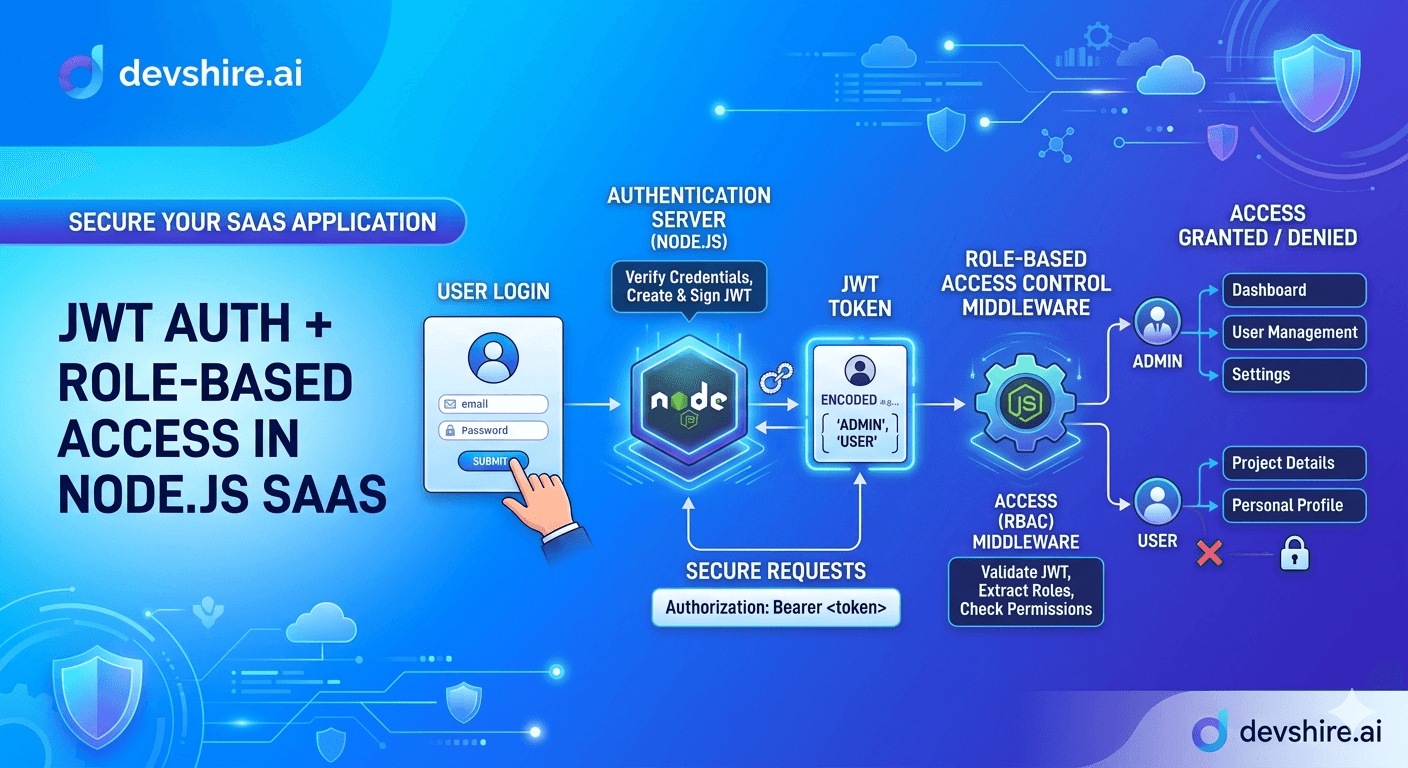
You've got a multi-tenant SaaS app. There's an admin who can do everything, a member who can view stuff, and a billing role that touches invoices only. You're three days into building auth and you've got a mess of if/else checks scattered across fifteen route handlers. Sound familiar? JWT authentication and role-based access control (RBAC) is one of those things that looks simple until you're actually building it for a production SaaS. The basic JWT flow takes an afternoon. The full system — token rotation, role hierarchies, permission checks at the right layer, audit logging — that's a week of careful engineering if you want it to hold up. This post walks through the exact implementation: the JWT auth layer, the RBAC middleware pattern, and the common mistakes that cause security gaps in real Node.js SaaS apps.
💡 TL;DR
JWT authentication in Node.js SaaS apps requires more than just signing tokens. You need: short-lived access tokens (15 minutes max), a refresh token rotation system with server-side invalidation, role claims embedded in the token payload, and RBAC middleware that checks permissions at the route level — not inside business logic. Skip any of these and you have either a security gap or an unscalable auth system. The full implementation takes 3–5 days of focused engineering. Here's exactly how to build it.
Stop Storing JWT Tokens in localStorage — Seriously
Every tutorial shows you how to generate a JWT and store it in localStorage. And almost every production SaaS that follows that pattern eventually has a problem. LocalStorage is accessible to any JavaScript running on the page, which means a cross-site scripting (XSS) attack can read your tokens. The solution isn't to give up on JWTs — it's to store them in httpOnly cookies.
An httpOnly cookie cannot be accessed by JavaScript, full stop. It's sent automatically with every request to your domain. And you can add the Secure flag so it only transmits over HTTPS. This is the production-grade storage pattern. It's slightly more work to set up than localStorage, and it requires you to think about CSRF protection — but that's a trade-off worth making.
⚠️ Common advice that causes security issues
"Store your JWT in localStorage for easy access." This is in every beginner tutorial. In a production app with user data, it's the wrong call. Use httpOnly, Secure, SameSite=Strict cookies for your auth tokens. Your frontend can't read them — but neither can an attacker's injected script.
The CSRF concern with cookies is real but manageable. Use the SameSite=Strict cookie attribute for most cases. If you need cross-origin requests, implement the Synchroniser Token Pattern with a CSRF token in a separate readable cookie. That's the setup most production SaaS apps use.
The Token Architecture You Actually Want
A production JWT auth system for SaaS isn't just one token. It's two: a short-lived access token and a longer-lived refresh token. Here's why that matters and how the two work together.
The access token is what your API validates on every request. Keep it short — 15 minutes is a common choice, 1 hour is acceptable, anything longer than 24 hours is a mistake. Why? Because JWTs are stateless. Once issued, you can't invalidate them server-side without extra infrastructure. A stolen access token is valid until it expires. Keep the expiry short, and the damage window is small.
The refresh token lives longer — typically 7–30 days — and is stored server-side in your database. When the access token expires, your client hits a refresh endpoint with the refresh token, and you issue a new access token. This gives you server-side control: if you need to log a user out or revoke access immediately, you delete their refresh token from the database. Their next access token request fails. That's proper session management.
Token Type | Expiry | Storage | Revocable? |
|---|---|---|---|
Access Token | 15 min – 1 hour | httpOnly cookie | No — wait for expiry |
Refresh Token | 7–30 days | httpOnly cookie + DB | Yes — delete from DB |
Long-lived token (no refresh) | Days or weeks | localStorage (common mistake) | No — serious security risk |
One more thing: implement refresh token rotation. Every time a refresh token is used, issue a new one and invalidate the old one. This detects token theft — if someone uses a refresh token that's already been rotated, it means two parties have the same token, and you can invalidate the entire session family.
Building RBAC Middleware That Actually Scales
Role-based access control is where most Node.js SaaS apps get messy. Teams start with simple if-checks inside route handlers: if (user.role === 'admin') do this. Then the roles multiply. The checks scatter across the codebase. A new developer misses one. A permission that should be admin-only ends up accessible to members. This is how auth bugs happen in production.
The right pattern is middleware-based RBAC. Define permissions centrally, enforce them at the route layer, and keep business logic completely permission-agnostic. Here's the three-layer structure that works.
1️⃣ Layer 1 — JWT Verification Middleware
This middleware runs first on every protected route. It extracts the JWT from the cookie, verifies the signature using your secret key, checks the expiry, and attaches the decoded payload to req.user. If verification fails for any reason, return 401 immediately. Don't let the request proceed. This layer should be completely generic — it doesn't know anything about roles or permissions.
2️⃣ Layer 2 — Permission Check Middleware
Build a requirePermission(permission) middleware factory. When you define a route, you pass in the required permission: router.get('/users', requirePermission('users:read'), getUsersHandler). Inside the middleware, check whether req.user.role has that permission according to your central permissions map. If not, return 403. This keeps all permission logic in one place and makes your route definitions self-documenting.
3️⃣ Layer 3 — Central Permissions Map
Define all roles and their permissions in a single config object. Something like: PERMISSIONS = { admin: ['users:read', 'users:write', 'billing:read', 'billing:write'], member: ['users:read'], billing: ['billing:read', 'billing:write'] }. When requirements change — and they will — you update this one file. Nothing else needs to change. This is the difference between a maintainable RBAC system and a codebase full of scattered permission checks.
Multi-Tenancy: The Permission Layer Most Tutorials Skip
Here's a scenario that breaks simple RBAC systems: user A is an admin in Organisation 1 and a member in Organisation 2. A simple role check based on user.role breaks the moment you have users with different roles across different tenants.
Multi-tenant SaaS apps need to scope permissions to the organisation context. Your JWT payload should include not just the user's role, but which organisation the current session is operating in. Something like: { userId: '123', orgId: '456', role: 'admin' }. Every permission check then validates against this triple — not just the role in isolation.
In practice, this means your requirePermission middleware also checks that req.user.orgId matches the resource being accessed. An admin in Org 1 shouldn't be able to delete users from Org 2 — even if their token says admin. This object-level permission check (sometimes called row-level security or resource-level authorisation) is the layer that most beginner implementations skip entirely. And it's where real-world data leakage happens.
📌 Real-World Scenario
A B2B SaaS team we worked with discovered their permission system had no org-level scoping. An admin at one client company could query the API with a valid token and retrieve data from another client's account by changing the resource ID in the request. The JWT was valid. The role was correct. But the resource didn't belong to that user's organisation. Always scope data queries by orgId — and validate that orgId matches the resource before returning anything.
Trusted by 500+ startups & agencies
"Hired in 2 hours. First sprint done in 3 days."
Michael L. · Marketing Director
"Way faster than any agency we've used."
Sophia M. · Content Strategist
"1 AI dev replaced our 3-person team cost."
Chris M. · Digital Marketing
Join 500+ teams building 3× faster with Devshire
1 AI-powered senior developer delivers the output of 3 traditional engineers — at 40% of the cost. Hire in under 24 hours.
What to Put in Your JWT Claims — and What to Leave Out
JWT payloads are base64-encoded, not encrypted. Anyone who holds a token can decode the payload and read it. This matters for what you choose to include.
Good things to include in JWT claims: userId, orgId, role, token expiry (exp), issued-at time (iat), a unique token ID (jti) for tracking. These are all values your server needs on every request and that don't create security issues if visible to the token holder.
Don't include in JWT claims: passwords (obviously), sensitive PII (SSN, credit card numbers), internal system flags, pricing tiers that could be manipulated, or anything that gives a user information about your system architecture. Keep the payload small. Large JWTs add overhead to every API request — keep yours under 500 bytes.
Logging Auth Events: What You Need for Security and Compliance
Every auth event should be logged. Not just failed attempts — successful logins, logouts, token refreshes, permission denials, and role changes all matter. This is your security audit trail, and it's also what SOC 2 auditors want to see.
For each event, log: the event type, the userId, the orgId, the IP address, the user agent, a timestamp (UTC), and whether the event succeeded or failed. Store these logs separately from your application data — ideally in an append-only log store that can't be modified by application code.
One specific thing most teams miss: log permission denials, not just authentication failures. A flood of 403s on a specific resource from a specific userId is a signal worth investigating — it might be a misconfigured client, or it might be an account probing for access it doesn't have.
The Bottom Line
Store JWTs in httpOnly, Secure, SameSite cookies — not localStorage. This one change eliminates the XSS token theft risk that plagues most SaaS implementations.
Use a two-token system: short-lived access tokens (15 minutes to 1 hour) and longer-lived refresh tokens stored server-side. This gives you the ability to invalidate sessions immediately when needed.
Build RBAC as middleware, not as if/else checks inside route handlers. Define all permissions in a central config. Enforce at the route layer. Keep business logic permission-agnostic.
Multi-tenant apps need resource-level permission checks, not just role checks. Validate that the resource's orgId matches the user's orgId on every data access — not just at the role level.
Implement refresh token rotation. When a refresh token is used, issue a new one and invalidate the old one. Reuse of an old refresh token signals theft and should invalidate the entire session.
Keep JWT payloads small and non-sensitive. Include userId, orgId, role, jti, exp, iat — nothing else. Base64 is not encryption. Treat your payload as readable by the token holder.
Log every auth event — successes, failures, and permission denials. Store logs separately from your application database with append-only access from application code.
Frequently Asked Questions
What is JWT authentication and how does it work in a Node.js SaaS app?
JWT (JSON Web Token) authentication works by issuing a signed token to a user after they log in. That token contains claims — like the user's ID, role, and expiry — and is signed with a secret key only your server knows. On every subsequent request, your server verifies the signature and extracts the claims without needing to hit the database. This makes JWTs fast and stateless, but it also means you can't invalidate them server-side without extra infrastructure — which is why short expiry times are critical.
What's the difference between authentication and authorisation in a SaaS app?
Authentication is verifying who the user is — that's the JWT layer. Authorisation is determining what they're allowed to do — that's the RBAC layer. Both are required. Authentication without authorisation means any logged-in user can do anything. Authorisation without solid authentication means your role checks can be bypassed. Build both, in that order.
How long should a JWT access token be valid in a SaaS app?
15 minutes to 1 hour is the standard range for most production SaaS apps. Shorter is more secure — a stolen token is valid for less time. Longer reduces the frequency of token refresh requests, which matters for user experience on high-traffic apps. Most teams land at 15–30 minutes for access tokens paired with a 7-day refresh token. Anything beyond 24 hours for an access token is generally considered a security risk.
What is role-based access control (RBAC) and when do I need it?
RBAC is a system where users are assigned roles (admin, member, billing, etc.) and each role has a defined set of permissions. You need it the moment you have more than one type of user in your app. If you're building a B2B SaaS with admins and regular users, RBAC is table stakes — not an optional extra. The alternative is hardcoded permission checks scattered across your codebase, which breaks every time your role requirements change.
How do I handle JWT authentication in a multi-tenant SaaS app?
Include the orgId in your JWT payload alongside the userId and role. Then enforce resource-level access checks that validate not just the role, but whether the resource being accessed belongs to the user's organisation. A user who is admin in Org A should never be able to access data belonging to Org B, even with a valid admin token. This org-scoped permission check is the most commonly missed security layer in multi-tenant SaaS.
Should I use a library for JWT auth in Node.js or build it from scratch?
Use a library for the token signing and verification — jsonwebtoken is the standard in the Node.js ecosystem. Don't write your own cryptographic implementation. But build the RBAC middleware layer yourself. The role and permission logic is specific to your domain and changes frequently. Libraries that abstract RBAC completely (like casbin) are useful at scale but add complexity that most early-stage SaaS apps don't need. Start with a central permissions config and custom middleware.
What's the most common JWT security mistake in Node.js SaaS apps?
Storing tokens in localStorage and using long expiry times without a refresh token system. These two mistakes together mean a stolen token is valid for days or weeks and can't be revoked. Use httpOnly cookies for storage, keep access tokens short-lived, and implement server-side refresh token management so you can invalidate sessions immediately when needed.
Need a Developer Who Builds Auth Systems That Hold Up in Production?
devshire.ai matches SaaS teams with pre-vetted Node.js developers who've built JWT auth and RBAC systems for production multi-tenant apps. Get a shortlist in 48–72 hours — already screened for security-aware development experience.
Find a Node.js Auth Developer at devshire.ai →
No upfront cost · Shortlist in 48–72 hrs · Freelance & full-time · Stack-matched candidates
About devshire.ai — devshire.ai matches AI-powered engineering talent with SaaS product teams. Every developer in the network has passed a live proficiency screen covering tool use, output validation, and real codebase review. Freelance and full-time options. Typical time-to-hire: 8–12 days. Start hiring →
Related reading: SaaS Security Best Practices · Hire a Node.js Developer with AI Skills · GDPR Compliance for SaaS Startups · API-First SaaS Development · How to Build a Multi-Tenant SaaS · Build a SaaS MVP Fast







Devshire Team
San Francisco · Responds in <2 hours
Hire your first AI developer — this week
Book a free 30-minute call. We'll match you with the right developer for your project and get you started within 24 hours.
<24h
Time to hire
3×
Faster builds
40%
Cost saved