
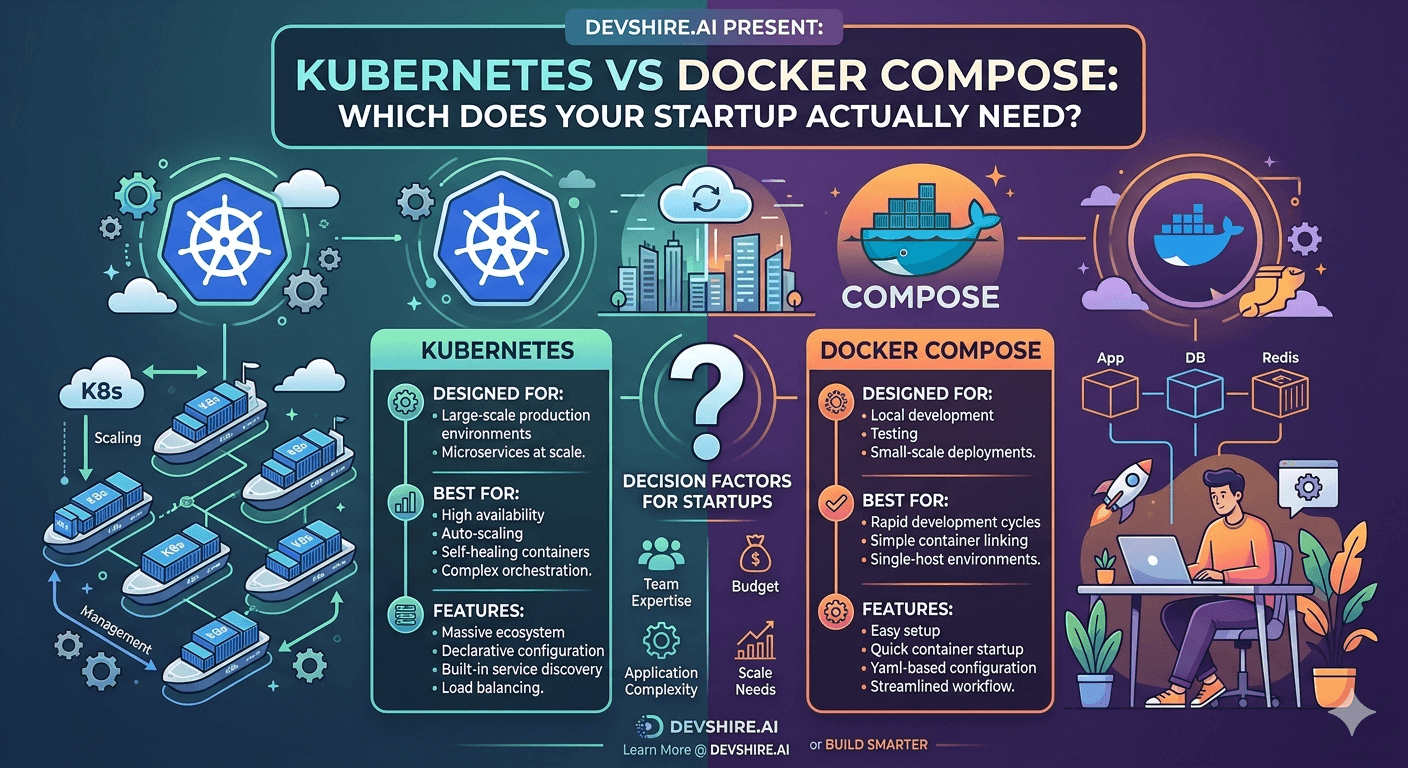
Every startup infrastructure conversation eventually hits the same fork: should we use Kubernetes? The people saying yes usually cite scale, resilience, and industry standards. The people saying not yet cite complexity, maintenance overhead, and the two engineers who'd need to become effective Kubernetes operators. Both sides are partially right, and the answer depends almost entirely on things you can actually measure: your team size, your service count, your traffic pattern, and whether you have specific requirements that simpler orchestration can't meet. Here's the honest comparison — including the managed alternatives that most comparisons skip.
💡 TL;DR
Docker Compose is for local development and small single-host deployments. Kubernetes is for complex multi-service production deployments at scale. Most startups don't need Kubernetes — they need a managed container service like AWS ECS, Google Cloud Run, or Railway that gives them Kubernetes-level resilience without Kubernetes operational complexity. The decision isn't "Compose vs Kubernetes" — it's "do I need Kubernetes or will a managed container platform cover my requirements?"
What Each Tool Actually Does
The comparison gets muddled because these tools solve related but different problems. Being clear about what each is for prevents the common mistake of using one where the other is more appropriate.
Factor | Docker Compose | Kubernetes | Managed (ECS / Cloud Run) |
|---|---|---|---|
Primary use case | Local dev, simple single-host deployments | Complex multi-host production orchestration | Production container hosting without K8s ops |
Operational complexity | Low — YAML + docker commands | High — control plane, node pools, networking | Low — managed by cloud provider |
Auto-scaling | Not supported | Full HPA and VPA support | Built-in, managed by platform |
Rolling deployments | Manual only | Native support | Native support |
Multi-host | Single host (without Swarm) | Multi-host by design | Managed multi-host |
Learning curve | Low — most devs know it | High — 2–4 months to operational proficiency | Moderate — similar to Compose with cloud IAM |
When Docker Compose Hits Its Limits
Docker Compose is not a production orchestrator. It was built for local development and simple single-host deployments. The limitations become problems at a specific threshold.
❌ No automatic container restart on failure across hosts
Compose can restart containers on the same host using restart: always. But if the host machine fails, Compose can't restart containers on a different machine. For any production service with uptime requirements, single-host container management is a single point of failure. This is the primary limit that drives teams toward Kubernetes or managed alternatives.
❌ No built-in auto-scaling
Compose has no mechanism to add more container instances automatically when CPU or memory usage spikes. You can manually scale with docker-compose up --scale api=3 but this requires human intervention. For applications with variable traffic, this means either over-provisioning (expensive) or slow response to traffic spikes (user-impacting).
❌ Zero-downtime deployments require external tooling
Updating a Compose service causes a brief downtime while the old container stops and the new one starts. Zero-downtime rolling deployments require either a load balancer in front with manual switching or external tooling. This is a valid tradeoff for low-traffic internal tools; it's not acceptable for customer-facing production services.
The Real Cost of Kubernetes for a Startup
Kubernetes is powerful. It's also expensive in ways that don't appear on the GKE or EKS pricing page. The operational cost is the line item that catches startups off guard.
⏰ Engineering time to reach operational proficiency
A developer going from zero Kubernetes knowledge to genuinely comfortable with a production cluster — including networking, RBAC, node pool management, ingress controllers, and monitoring — takes 2–4 months of focused learning and real cluster experience. For a 3-person startup, this isn't a small cost. That's 2–4 months of one engineer's capacity that doesn't ship product features.
💰 Minimum viable cluster cost
A production-grade Kubernetes cluster on AWS EKS with a small node pool and the managed control plane costs $150–$300/month minimum before running any workloads. Add the cost of a dedicated node pool that can handle traffic spikes and you're typically at $400–$800/month for a minimal setup. Google Cloud Run or AWS ECS serving the same application costs $20–$80/month at low volume.
🔧 Ongoing maintenance overhead
Kubernetes requires regular version upgrades (the support window is 14 months per minor version). Node security patching. Certificate rotation. Monitoring of cluster health separate from application health. These tasks are real, recurring, and require someone who understands Kubernetes well enough to do them without breaking the cluster. On a small team, this is a consistent drain on engineering capacity.
⚠️ The advice that's wrong
Many guides say "use Kubernetes to be production-ready." This conflates Kubernetes-specific features with production-readiness in general. Production-readiness requires: automatic failover, rolling deployments, auto-scaling, health checks, and structured logging. All of these are available on managed services like Cloud Run and ECS — without Kubernetes complexity. "Production-ready" doesn't require Kubernetes.
The Middle Ground: Managed Container Services
The choice between Compose and Kubernetes misses the category that most startups should actually use: managed container platforms that abstract the orchestration layer entirely.
☁️ Google Cloud Run
Fully managed, scales to zero, charges per request. Zero cluster management. Deploy a container image and Cloud Run handles auto-scaling, rolling deployments, and traffic routing. For request-driven workloads (APIs, web apps), this covers the vast majority of startup needs at dramatically lower cost and complexity than Kubernetes. The limit: no persistent compute, not great for long-running background workers.
🟠 AWS ECS (Elastic Container Service)
More configuration than Cloud Run but more flexibility. Define tasks and services, set CPU/memory, configure auto-scaling policies, and ECS handles placement, health checks, and rolling deployments. Integrates deeply with other AWS services via IAM. Costs more than Cloud Run at zero traffic (minimum service configuration) but handles background workers and persistent processes better.
🚂 Railway
The simplest managed container deployment for teams that don't want to think about cloud infrastructure. Connect a GitHub repository, Railway detects the project type, builds the Docker image, and deploys it. Supports databases, environment variables, and zero-downtime deploys. The fastest path from Docker image to production URL. Pricing is predictable and starts at $5/month. Not appropriate for enterprise compliance requirements or very high scale, but exactly right for most startup MVPs.
Trusted by 500+ startups & agencies
"Hired in 2 hours. First sprint done in 3 days."
Michael L. · Marketing Director
"Way faster than any agency we've used."
Sophia M. · Content Strategist
"1 AI dev replaced our 3-person team cost."
Chris M. · Digital Marketing
Join 500+ teams building 3× faster with Devshire
1 AI-powered senior developer delivers the output of 3 traditional engineers — at 40% of the cost. Hire in under 24 hours.
When Kubernetes Actually Makes Sense
After pushing back on premature Kubernetes adoption, it's worth being clear about the signals that genuinely indicate it's the right choice. These are specific — not vague references to "scale" or "enterprise needs."
✅ You have 10+ microservices with complex inter-service networking
When service-to-service communication patterns, network policies between services, and service mesh requirements exceed what ECS task definitions or Cloud Run can express cleanly, Kubernetes networking becomes the right tool. Below this threshold, managed services handle inter-service communication adequately.
✅ You have compliance requirements for infrastructure isolation
Some compliance frameworks (FedRAMP, specific healthcare regulations) require dedicated infrastructure that shared managed services can't provide. Kubernetes on dedicated nodes gives you the infrastructure isolation that compliance requires while maintaining container orchestration.
✅ You have a dedicated platform engineer
If you have a team member whose primary role is infrastructure and who has prior Kubernetes experience, the operational cost calculation changes. The learning curve and maintenance overhead are absorbed by someone whose job it is to manage the platform. Without this, Kubernetes pulls engineering capacity from product development continuously.
[INTERNAL LINK: Docker startup containerisation guide → devshire.ai/blog/docker-startups-containerise-app-right-way]
The Bottom Line
Docker Compose is for local development and simple single-host deployments — not for production orchestration. Its limitations (no auto-scaling, no multi-host failover) are real and hit at a low threshold.
Most startups don't need Kubernetes. They need production-ready container orchestration — which managed services like Cloud Run, ECS, and Railway provide without Kubernetes operational overhead.
A minimal Kubernetes cluster costs $400–$800/month and 2–4 months of engineering time to operate competently. Cloud Run or ECS serving the same workload costs $20–$200/month with no specialist knowledge required.
Kubernetes makes sense when you have 10+ microservices with complex networking requirements, compliance-driven infrastructure isolation needs, or a dedicated platform engineer with prior Kubernetes experience.
"Production-ready" doesn't require Kubernetes. Auto-scaling, rolling deployments, health checks, and automatic failover are all available on managed container services without Kubernetes complexity.
For most startups: Docker Compose for local development, Cloud Run or ECS or Railway for production. Revisit Kubernetes when you hit the specific requirements it's designed for.
Frequently Asked Questions
Should a startup use Kubernetes or Docker Compose for production?
Neither, in most cases. Docker Compose wasn't designed for production orchestration. Kubernetes is powerful but carries significant operational complexity for teams without dedicated infrastructure engineers. The right choice for most startups is a managed container service — Google Cloud Run, AWS ECS, or Railway — that provides production-grade orchestration (auto-scaling, rolling deployments, health checks) without requiring Kubernetes expertise.
When should a startup move from Docker Compose to Kubernetes?
When you have a specific requirement that managed container services can't meet — typically 10+ services with complex networking policies, compliance requirements for dedicated infrastructure, or a team with a dedicated platform engineer who can manage the cluster. Don't move to Kubernetes because of vague notions of "scale" or "industry standard" — move when you have a concrete requirement that simpler alternatives don't address.
Is Docker Compose suitable for production deployments?
For very simple single-host deployments of internal tools, yes — with the caveat that it has no built-in auto-scaling or multi-host failover. For customer-facing production services with uptime requirements, Docker Compose alone is insufficient. If the host machine fails, your service is down until you manually intervene. For production services, use a managed platform (Cloud Run, ECS, Railway) that handles failover and scaling automatically.
How much does Kubernetes cost for a small startup?
A minimal production-grade Kubernetes cluster typically costs $400–$800/month when you include the managed control plane fee (AWS EKS is $72/month, GKE is $72/month for Autopilot-billed clusters) plus the node pool instances needed to run your workloads. Beyond infrastructure cost, there's the engineering time cost — 2–4 months to reach operational proficiency, plus ongoing cluster maintenance. The same workloads run on Cloud Run or ECS typically cost $20–$200/month with no specialist knowledge required.
What is the difference between Kubernetes and Docker?
Docker is a containerisation platform — it packages applications and their dependencies into portable container images. Kubernetes is a container orchestration system — it manages where and how containers run across a cluster of machines, handling scheduling, scaling, networking, and self-healing. Docker creates containers; Kubernetes manages fleets of containers across multiple hosts. You need Docker to build container images; you need Kubernetes (or a managed alternative) to run those containers reliably at scale.
What are the best alternatives to Kubernetes for startups?
Google Cloud Run for request-driven workloads (APIs, web apps) that can scale to zero — simplest option with the lowest operational overhead. AWS ECS for teams on AWS who need more configuration flexibility and good background worker support. Railway for the fastest path from Docker image to production URL without cloud infrastructure knowledge. Render for a slightly more developer-friendly alternative to Railway with better background worker support. Each covers the core production requirements (auto-scaling, rolling deployments, health checks) without Kubernetes operational complexity.
Can I use Docker Compose for a microservices architecture?
For local development, yes — Docker Compose is excellent for running a multi-service local development environment. For production microservices, no — Docker Compose runs on a single host, has no auto-scaling, and has no mechanism for distributing services across multiple machines for resilience. Production microservices at any meaningful scale require Kubernetes or a managed orchestration platform that handles multi-host deployment and service discovery properly.
Need a Developer to Set Up Your Production Infrastructure?
devshire.ai matches product teams with developers experienced in containerisation, cloud deployment, and infrastructure setup — whether that's ECS, Cloud Run, Kubernetes, or Railway. Get a pre-vetted shortlist in 48–72 hours.
Start Your Search at devshire.ai →
No upfront cost · Shortlist in 48–72 hrs · Freelance & full-time · Stack-matched candidates
About devshire.ai — devshire.ai matches AI-powered engineering talent with product teams. Every developer has passed a live proficiency screen. Typical time-to-hire: 8–12 days. Start hiring →
Related reading: Docker for Startups: How to Containerise Your App the Right Way · Best Tech Stack for Startups in 2026 · How to Scale Your MVP to 10k Users · How to Automate Your Startup Backend With AI · SaaS Security Best Practices







Devshire Team
San Francisco · Responds in <2 hours
Hire your first AI developer — this week
Book a free 30-minute call. We'll match you with the right developer for your project and get you started within 24 hours.
<24h
Time to hire
3×
Faster builds
40%
Cost saved